Touch typing mistakes: finding the key pairs that slow you down
Typing errors tend to cluster on a few key transitions, not on whole letters. Learn the types of error, why same-finger reaches trip people up, and how to practise your weakest pairs.
If you keep making the same typing mistakes, the cause is often not "all the letters". It is more likely a handful of specific movements, such as one finger reaching for a neighbouring key, or one awkward jump between two letters. Finding those movements is quicker and kinder than another round of the whole alphabet. This guide explains the kinds of error, why key pairs are a useful unit, and how to practise them.
This post is part of our touch typing series. For the full learning path, start with the touch typing guide.
- Typing errors fall into a few types, such as wrong key, missed key, extra key and swapped keys, and each points to a different fix.
- A useful thing to track is the pair: a key and the one you typed just before it. Errors and slow spots can cluster on particular pairs.
- Same-finger pairs, where one finger must cover two keys in a row, are a good place to look first. Drill your weakest pairs, not the whole keyboard.
The kinds of typing error
Take the word "the". The research notes behind Tutype list several distinct ways to get a character wrong, and they are worth telling apart. The likely causes in the table are our own reading, offered as things to check.
| Option | Good fit | Trade-off |
|---|---|---|
| Substitution | A wrong key for the right one: "thw" instead of "the". | Often a neighbouring key, which may mean the reach is not yet accurate. |
| Omission | A missed character: "th". | May come from a rushed rhythm or a key press that did not register. |
| Insertion | An extra character: "thre". | May be a finger brushing a neighbouring key on the way. |
| Transposition | Two characters swapped: "teh". | Fingers arriving in the wrong order, which can happen when the hands alternate. |
| Capitalisation, punctuation, space | "the" for "The", a missing comma, or two words run together. | Shift timing and the little finger's reach are worth checking. |
Why bother labelling them? Because the fix can differ. A substitution suggests slowing down and checking where the finger travels. A transposition suggests two keys are being triggered in the wrong order and need short, slow repetition together. You can only see this if you look at what actually went wrong, not just at a percentage.
Why the key pair is a useful unit
A single letter is rarely hard on its own. What can be hard is getting to it from where your finger just was. The same letter might be easy after one key and clumsy after another. The Tutype research notes call this transition difficulty, the error rate and delay for each "previous key to target key" pair, and describe it as the most useful unit to track.
Redoing the alphabet spreads your effort evenly across 26 letters. If your slips sit in three or four pairs, that is mostly effort spent on keys you already handle well. A short list of pairs you actually miss makes a better practice plan.
Same-finger reaches
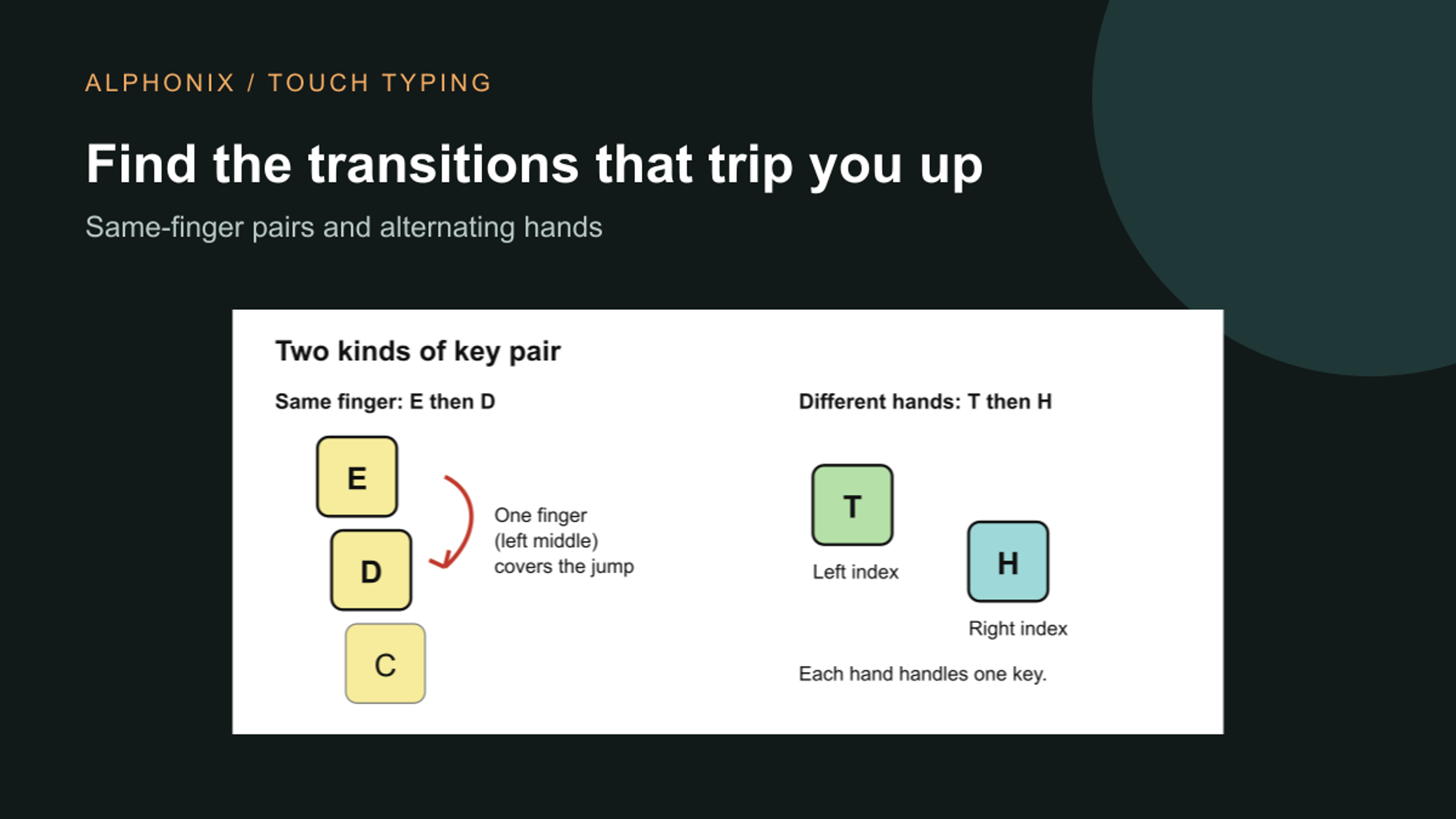
On a QWERTY keyboard each finger owns a column of keys. When two consecutive letters belong to the same finger, that finger has to travel, release and travel again with no help from a second hand. Examples, using standard finger positions, are E then D, with the left middle finger covering both, U then N, with the right index covering both, and B then R, both left index.

Pairs on different hands, such as T then H, are usually easier because one hand can get ready while the other types. That is a tendency, not a rule, and everyone has their own awkward pairs. Same-finger movements are simply a sensible place to look first, which is why Tutype's English course has a lesson on them after common pairs and double letters.
Practise the weakest pairs, not the whole alphabet
A useful routine for any tool or none:
First, note which pairs you miss. Check the words where you slip and ask which key came just before the wrong one. After a few attempts a pattern often appears. Second, drill each weak pair alone, slowly, a few times, such as "ed ed ed". Third, put it back into real words that contain it. Fourth, finish with something easy so you leave on a clean run.
Keep it short, since the research notes behind Tutype suggest sessions of about 5 to 10 minutes, and come back another day: a movement you can do once is not yet one you own. Keep your hands relaxed and slow down until the pair is clean. Accuracy first is the same advice as in our guide to net WPM and accuracy, and the finger map for each key is in the home row and finger zones.
How Tutype is designed to help
Tutype is our touch typing app. It is in development and we plan to launch it soon, so this section describes the design, and we have no learner results to show. As designed, each keystroke made in flow is filed under its pair, the previous character and the target one, along with how long it took and whether it was right. Retries after Backspace are skipped and so is the pause after a miss, so recovery time does not make a pair look slow. Pairs that touch a space are not ranked, since they are word boundaries. Pairs are ranked by how error-prone and how slow they are compared with your own usual pace.
After a run, the results screen is designed to give up to three ranked notes. Each says what happened, why it matters and what to practise. The notes can point to a pair that keeps going wrong, a slow transition, misses crowded onto one finger's keys or one row, a Shift slip, the same wrong key repeatedly for the same target, or accuracy falling in the second half of the run. A clean run gets no filler. Because a browser can see which keys arrive but not which finger pressed them, anything about fingers is worded as a suggestion, for example that both keys are usually one finger's, so it may help to practise that jump on its own.
A review drill follows, of about 45 seconds at your own speed. It isolates up to three of your weakest pairs, such as "jk jk jk", then uses each in real words, mixes in one pair you already type well, and ends on easy short words. It draws text only from lessons up to your current one, so it never shows a letter you have not been taught. History is stored in your browser as counts and timings, not the text you typed. The thresholds and ranking in the app are starting points that we still need to validate.
What this will not do
Finding weak pairs will not guarantee a speed or a date. Most keyboarding research is small, and there is no standard assessment, so treat any method, ours included, as something to try and watch. Kiswahili has its own common pairs and syllables, and we are writing about that separately in typing in Kiswahili. If you want to hear when Tutype launches, or talk about using it in a school, get in touch with us. If you are planning a learning app of your own, see our web development service.
How we prepared this guide
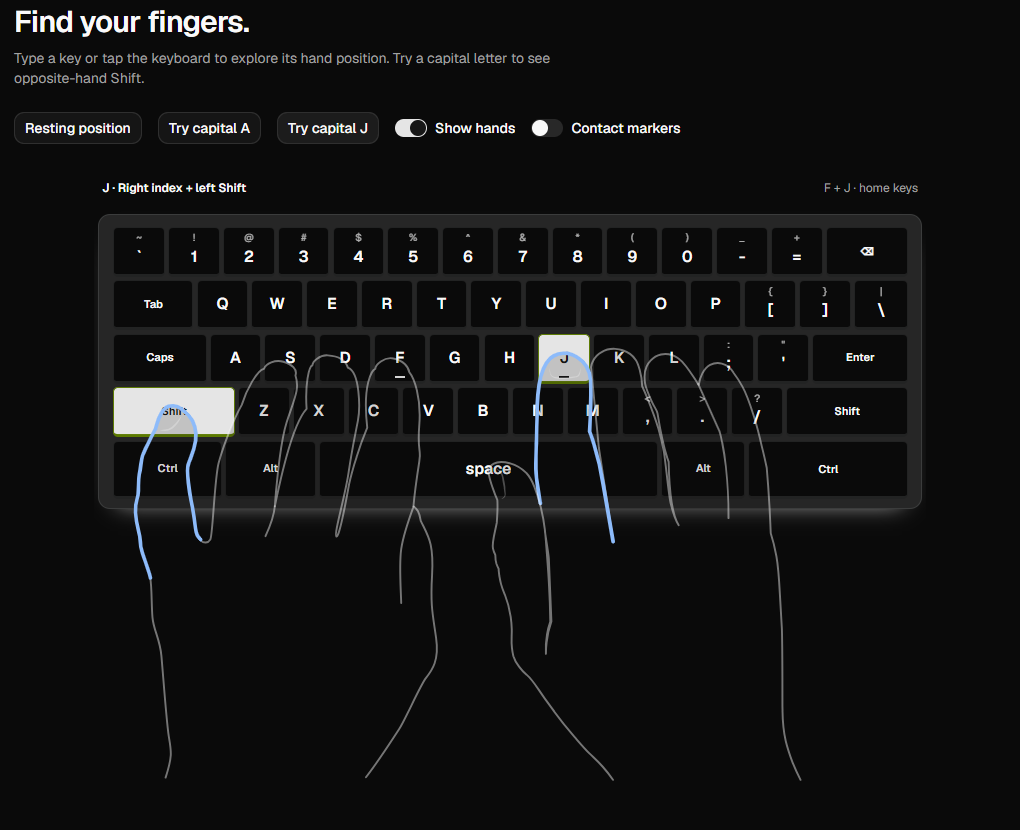
Written by Alphonix. The error types, the key-pair approach and the description of Tutype's feedback and review drill come from the research notes and code in the Tutype repository, which we read (typing-pedagogy-research.md and the feedback, transitions and review modules). Finger assignments are standard QWERTY touch typing positions. The example words are ours and illustrative, and the likely causes we give for each error type are our reading, not research findings. Tutype is a product we are building and have not launched, so everything about it is described as designed, with no learner results. The screenshot is from our development build; the pair diagram was drawn by Alphonix.
Facts reviewed